


Crafting Personalized Gifts with the M1s Laser Engraver
There's something special about personalized gifts. They hold deep feelings and show you care. The M1s laser engraver helps you make these unique items, making it an essential tool for anyone looking to create memorable presents. More people want personalized gifts, and the market is expected to reach $30.79 billion by 2025. This growth comes from a desire for emotional connections and advancements in customization technology.
With the M1s, you can add a special touch to your gifts, making them unforgettable for any occasion. Imagine giving a beautifully engraved item that showcases your thoughtfulness! For those navigating the world of engraving, our Budget Laser Buyer’s Guide can help you make informed decisions, ensuring you find the perfect engraver to meet your creative needs.
Key Takeaways
Personalized gifts make strong emotional connections. They show you care and help you bond with loved ones.
The M1s laser engraver is easy to use and flexible. It can engrave on many materials, making it great for special gifts.
Safety is very important with the M1s. It has automatic pauses and safety checks, making engraving safe.
Start with simple designs and practice cuts for the best results. This helps you avoid mistakes and get good engravings.
Think of creative gift ideas for different events. Personalized items are special gifts that everyone will love.
Benefits of Engraving
Emotional Connection
When you give a personalized gift, you make a special bond. Studies show that engraved gifts create stronger feelings than regular ones. They meet our basic needs for belonging, recognition, and closeness. Each engraving reminds us of shared moments, making the connection with loved ones stronger. Imagine giving a beautifully engraved item that holds a special memory. It’s not just a gift; it’s a meaningful gesture that says a lot.
Unique and Memorable Gifts
Personalized gifts are different in a world of regular options. They show individuality and personal stories, making them more thoughtful and unforgettable. The M1s laser engraver helps you easily create these special items. Here are some features that make it a great choice for making memorable gifts:
Feature/Benefit |
Description |
|---|---|
Multi-purpose tool |
The M1s works for many projects, perfect for unique holiday gifts. |
Material compatibility |
It engraves wood, stone, glass, and leather, giving you many choices. |
Safety features |
Built-in safety features make it easy for beginners to use. |
Test cuts |
Doing test cuts helps ensure good results for your personalized gifts. |
Free software |
The software makes it easy to design custom gifts with 'cut ready' files. |
With the M1s laser engraver, you can achieve great precision. This allows for detailed designs that really stand out. Whether you want to engrave family photos or special messages, the options are endless. Each item you create is unique, making sure your gift is special and treasured.
Getting Started with the M1s Laser Engraver
Setup and Safety
Setting up your M1s laser engraver is super easy! Here’s how to do it safely:
Choose a Good Spot: Find a flat, stable place with good airflow. This keeps your workspace safe and comfy.
Unbox and Put Together: The M1s is almost ready to go. Just follow the quick-start guide to finish setting it up. You won’t need any special tools!
Plug It In: Connect the engraver to a power outlet. Make sure the power switch is off before you plug it in.
Install Software: Download the easy-to-use software from the Laservii website. This software helps you design and manage your engraving projects.
Safety First: Always wear protective eyewear when using the engraver. The M1s has safety features, like an automatic pause when the lid opens, so you can work safely.
Safety Certifications: The M1s laser engraver meets important safety standards:
Certification/Standard
Description
CE Marking
Follows European health, safety, and environmental rules
UL Certified
Safety and performance certification from Underwriters Laboratories
CSA Certified
Safety and performance certification from Canadian Standards Association
FDA Accession
Follows U.S. Food and Drug Administration rules
User-Friendly Features
The M1s laser engraver is great because it has user-friendly features. This makes it perfect for beginners and experienced users. Here’s what makes it easy to use:
Built-in Camera: The M1s has a camera that lets you see your designs clearly. This helps you avoid mistakes and makes sure your engravings look great.
Quick Setup: Users love how fast they can start using the M1s. Many say they got it running quickly, thanks to the clear instructions.
Easy Software: The Laservii software is simple to use. You can create custom designs without feeling confused.
Versatile Engraving: The M1s can engrave on many materials, like wood, glass, and leather. This gives you many options for your projects.
Here’s a quick comparison of the M1s with other models:
Feature |
M1s Laser Engraver |
Other Models |
|---|---|---|
Built-in camera |
Yes |
No |
Larger working area |
12" x 8" |
Smaller areas |
Engraving on curved surfaces |
Yes |
Limited |
Quick setup |
Yes |
Varies |
Ideal for novices |
Yes |
Some need more experience |
With these features, the M1s laser engraver makes it easy for you to start engraving. You can focus on being creative without getting stuck on complicated steps.
Unique Holiday Gifts Ideas
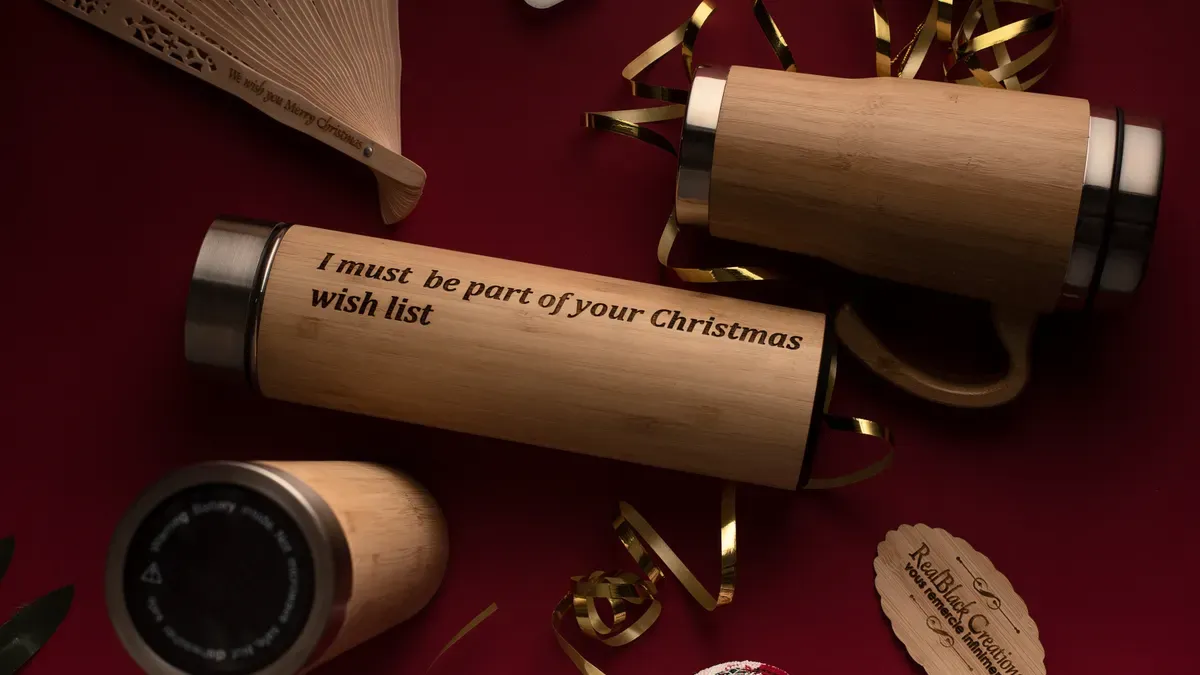
Finding the right gift can be hard. But with the M1s laser engraver, you can make special gifts that stand out. Here are some fun ideas for unique holiday gifts for different people.
Gifts for Him
When choosing gifts for men, personalized items always impress. Here are some great ideas you can make with the M1s laser engraver:
Engraved flasks for groomsmen
Personalized knives for big celebrations
Custom tumblers for his favorite drinks
Keychains as special keepsakes
Multi-tools for handy men
Drinking tumblers that keep drinks at the right temperature
You can use different materials to make these gifts special. Check out this table for some popular choices:
Material |
Description |
Common Uses |
|---|---|---|
Metal |
Gives clear, lasting lines that last for years. |
Wallets, flasks, jewelry |
Glass |
Needs careful setup to avoid cracking or clouding. |
Decorative items, awards |
Leather |
Gives a subtle, classy look. |
Portfolios, cardholders |
Wood |
Has a natural look and can be engraved deeply for a rustic feel. |
Keepsakes, coasters |
Gifts for Her
For the special women in your life, think about these personalized gifts that show you care:
High-quality pens for writers
Carabineers for adventurous spirits
Multi-tools for practical use
Cutting boards for chefs
Travel mugs for those on the go
Personalized jewelry that tells a story
Women love the clarity and lasting quality of laser engravings. Many feel these gifts add emotional value to the occasion. For example, a crystal plaque can bring strong feelings, making it a treasured keepsake.
Gifts for Kids
Making gifts for kids can be fun and rewarding. Here are some safe and popular choices:
Gift Option |
Description |
Personalization Feature |
|---|---|---|
Bamboo Baby Bowls |
Lightweight, easy to clean, and safe for kids. Great for meals. |
Can be engraved with a child's name. |
Kids Bamboo Tumblers |
Sized for little hands, cool to touch, and useful for daily use. |
Can be personalized with a special design. |
Eco-friendly and Sustainable |
Made from renewable bamboo, teaching kids about caring for the environment. |
Personalization adds a special touch. |
When making gifts for kids, think about safety. Use rounded edges, non-toxic materials, and make sure they are strong enough for play.
Gifts for Special Occasions
Personalized gifts are perfect for special occasions. Here are some ideas that can make any event memorable:
Gift Type |
Description |
|---|---|
Laser Engraved Bookmarks |
A great first project for learning engraving, perfect for personalizing gifts. |
Wooden Memory Boxes |
Engraved with family pictures or quotes, great for keeping precious moments. |
Custom Ornaments |
Engraved for special occasions, giving a personal touch over regular items. |
Engraved Cutting Boards |
Quick to make, personalized with family names, great for weddings or home kitchens. |
These unique holiday gifts show your thoughtfulness and create lasting memories for the recipients. With the M1s laser engraver, you can easily make these DIY personalized gifts that everyone will love.
Tips for Quality Engravings
Preparing Your Design
Before you start engraving, spend some time getting your design ready. This step is very important for getting the best results with your M1s laser engraver. Here are some tips to help you begin:
Choose the Right File Format: Use file types like SVG or DXF for the best fit with the engraving software.
Keep It Simple: Fancy designs can look nice, but they might not work well for engraving. Start with easier designs to build your skills.
Scale Your Design: Make sure your design fits in the engraving area of the M1s. A good tip is to leave some space around the edges for a clean look.
Tip: Always check your design in the software before engraving. This helps you find any problems early.
Testing and Calibration
Testing and calibration are key for getting great engravings. Here’s how to make sure your engravings come out just right:
Run Test Cuts: Before engraving your final piece, do a test cut on a scrap piece of the same material. This helps you change settings for power and speed.
-
Adjust Settings: If you see problems like burning fabric or uneven engraving, change your settings. For example:
Lower the power and speed to stop burning fabric.
Use cast acrylic for a smoother finish.
Change DPI settings for glass to get better results.
Regular Maintenance: Keep your M1s laser engraver clean and in good shape. This stops machine issues that could affect your engravings.
By following these tips, you can avoid common calibration mistakes and make sure your personalized gifts look great. Remember, practice makes perfect, so don’t be afraid to try different materials and designs!
Budget Laser Buyer’s Guide
Choosing the right engraver can be tough. There are many options to pick from. You want a machine that works for you and is affordable. Here are some important things to think about when picking a budget laser engraver:
Factor |
Description |
|---|---|
Laser Power and Wavelength |
Look for at least 20W power for deeper engraving. Fiber lasers are best for marking metal. |
Engraving Area and Speed |
Smaller areas work for jewelry. Larger projects need at least 150mm x 150mm work areas. |
Software Compatibility |
Make sure it works with software like LightBurn or EZCad2 for smooth use. |
Connectivity and Ease of Use |
Pick machines with USB or wireless options and easy-to-use interfaces. |
When you compare the M1s to other beginner models, its value stands out. The M1s has great features that make it special. Here’s a quick comparison with two popular models:
Feature |
Mecpow M1 |
X3 Pro |
|---|---|---|
Laser Module Output Power |
3.5W / 5W |
10W |
Engraving Speed |
10000 mm/min |
10000 mm/min |
Engraving Accuracy |
0.1 mm |
0.01 mm |
Working Area |
100x100 mm |
410x400 mm |
Wood Cutting Capability (1 Pass) |
1mm |
6mm |
Software Support |
MKSLaser (APP), LaserGRBL, LightBurn |
LaserGRBL (Free Software for Windows), LightBurn (Paid Software for Windows & Mac OS) |
Price Range |
Starting around $159 |
Higher than M1 |
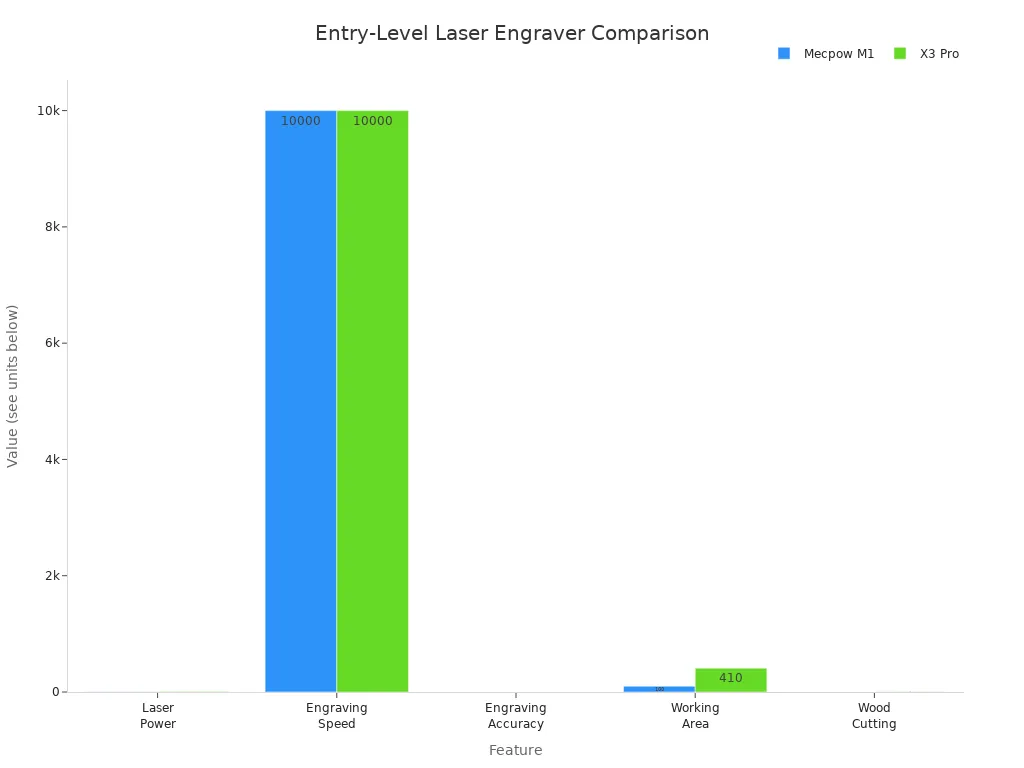
The M1s is easy to start using. It has a simple setup and offers full safety protection. It meets FDA Class I laser safety standards. This makes it good for common materials like wood and metal. On the other hand, the X3 Pro is for high-precision tasks, which is better for advanced users.
With the M1s, you get a dependable engraver that balances quality and price. Whether you’re making gifts for friends or starting a small business, the M1s is a great choice that won’t let you down.
Making personalized gifts with the M1s laser engraver is fun and rewarding. You can create special items that mean a lot to your friends and family. Here are some important benefits of using the M1s:
Feature/Benefit |
Description |
|---|---|
Affordability |
The M1s costs less than many other lasers. |
Ease of Setup |
It’s simple to set up with a helpful video guide. |
Generous Working Area |
The working area is big, perfect for larger projects. |
Safety Features |
It is very safe because it is a fully-enclosed laser. |
With more than 300 materials to choose from, you can let your creativity shine and make gifts that show your style. Each item you create is unique, making sure your gifts are special and remembered. So, why not get started and begin crafting? Your loved ones will love the care and effort you put into each personalized gift! 🎁
FAQ
What materials can I engrave with the M1s laser engraver?
You can engrave many materials like wood, glass, leather, and stone. This variety helps you make special gifts that fit what the person likes.
How safe is the M1s laser engraver for home use?
The M1s has a fully closed design and stops automatically when the lid opens. These safety features make it good for homes with kids and pets.
How long does it take to set up the M1s?
Setting up the M1s is fast and simple. Most people can get it ready in about 30 minutes because it comes almost put together and has clear instructions.
Can I use my own designs for engraving?
Yes! You can make custom designs using software like LightBurn. Just make sure your files are in the right format, like SVG or DXF.
What kind of support does Laservii offer?
Laservii gives 24/7 expert help and a one-year warranty for the M1s. You can contact them anytime for help with your engraving projects.
See Also
Effortlessly Create Customized Gifts Using M1s Laser Engraver


